Solutions · Support & Operations
Understand the issue.
Bring the context.
Connect the player's question with the activity behind it.
Bring available payment, session, bonus and support records into a shared analytical view. Investigate an individual query, explain a rise in contacts and give the next team a clearer handover.
A shared view of service
From individual queries
to recurring problems.
iGaming support analytics connects service contacts with player and operational data to explain what people need help with, where delays occur and which problems repeat. Gamblitude combines configurable Player Profiles with Dashboards, governed Metrics and AI analysis. Your support system remains the place to manage conversations and cases; the analytical layer helps teams understand the evidence around them.
Start with the available player history
Configure Player Profiles around the records your team needs: transactions, activity, campaign context and relevant Attributes. Match the person and transaction correctly, then distinguish a confirmed source status from information that has not arrived yet.
Separate workload from service deterioration
More contacts may reflect more players or payment attempts. Compare contact counts with an appropriate denominator, then break the rate down by issue, method, market and channel. Keep absolute workload visible alongside the rate.
Make handovers specific
Give payments, product or specialist teams the identifiers, timeline and unresolved question they need. Use Reports for recurring reviews and shared definitions for comparable results. Record the action and owner in the operational process your team already uses.
Inside the platform
Start with the player’s full context.
Player Profiles bring the available history into one view. Connected service, payment and product data can add context to a case before the team chooses its next step.
Explore the BI platform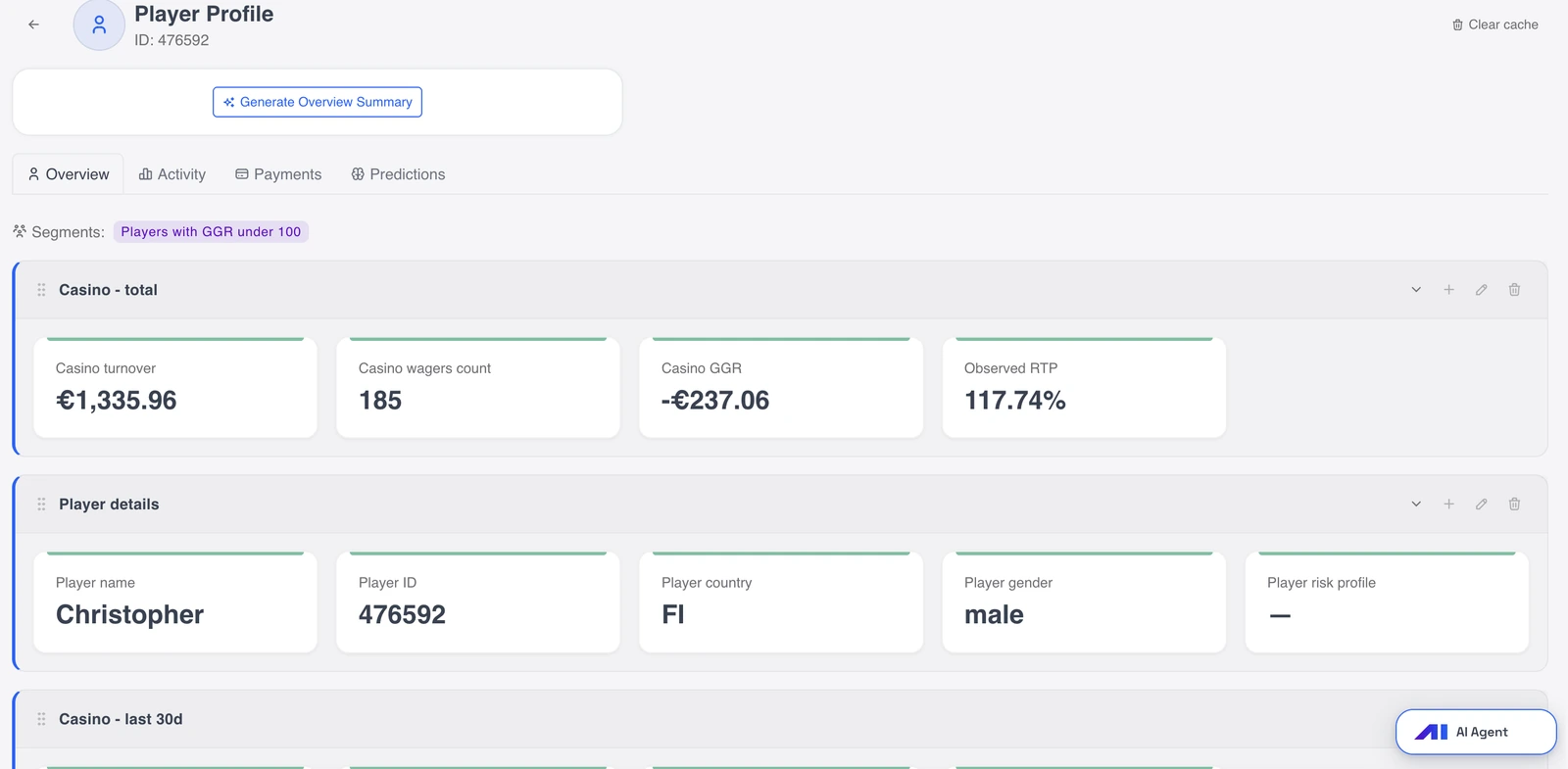
Four practical examples
From the first question
to a useful next step.
Explore the analysis, the comparisons and the context behind a decision. These are illustrative workflows, not customer results or preconfigured reports.
01 / Payment enquiry
Explain where a withdrawal is waiting
Which recorded stage explains this player's withdrawal query?
A withdrawal shows as approved, but the player has not received the funds. Support needs to distinguish operator approval from provider processing and completion using the available event history.
- Open the Player Profile and match the withdrawal identifier, amount and currency. Review available payment events in timestamp order.
- Compare requested, approved and provider-reported states. Check the source update time before treating a missing completion event as a failed payment.
- Read relevant account or bonus context only where it is connected and permitted. Isolate the unanswered question for the payments team.
Explain the confirmed stage or escalate the missing evidence. Payment execution and approval remain in the operator’s payment process.
02 / Contact spike
Read payment complaints against payment volume
Did payment friction increase, or did more people attempt a payment?
Payment-related contacts rose after a busy weekend. The support lead needs a workload view and an incident view: a larger queue does not necessarily mean a worse experience.
- Count deduplicated payment-issue contacts across comparable, fully loaded periods. Keep reopened conversations identifiable.
- Compare contacts per 1,000 payment attempts by method, market and device using Master Chart.
- Inspect affected player histories and transaction states. Check whether routing changes, issue tagging or a delayed feed could explain the apparent pattern.
Staff for actual volume while investigating methods whose normalised rate worsened. A concentrated pattern supports escalation; it does not prove the provider caused it.
03 / Shift planning
See which part of the backlog needs attention
Are new arrivals or ageing unresolved cases creating the pressure?
The queue grew, but is it a burst of easy enquiries or older cases awaiting specialist input? Connected ticket events make that distinction measurable.
- Reconcile opening backlog, new and resolved cases for the same queue and period. Include reopenings and transfers when present.
- Split unresolved cases by age, issue and assigned team. Compare the oldest groups with first-response and resolution measures rather than relying on a single average.
- Use a Dashboard for the current picture and a scheduled Report for shift reviews. Check ticket-status freshness.
Decide which queue needs capacity and which cases need specialist follow-up. The analysis informs staffing; it does not schedule agents or assign tickets.
04 / Recurring issue
Check whether the same problem brings players back
Which resolved issue types generate another contact within seven days?
A high closure count can hide repeat work. Did the payment, bonus or product issue actually get resolved? Subsequent contacts and operational history help explain.
- Define an eligible resolved-case cohort with a complete seven-day follow-up window. Agree how the same issue is identified across channels and ticket IDs.
- Compare repeat-contact rates by issue category and market, then inspect representative Player Profiles for unresolved activity or changed source statuses.
- Prepare a review of the initial issue, the recorded response and what happened afterwards. Keep unrelated new queries separate.
Review response guidance or escalate a recurring product problem. The case record and underlying activity determine what needs changing.
Agree the definitions
Define the service measures before comparing teams
Agree the event, denominator and clock behind each Metric. Comparable periods and consistent ticket categories matter as much as the chart. Keep workload measures separate from measures of player friction.
Contact rate
Deduplicated contacts divided by a relevant activity base, such as payment attempts, multiplied by 1,000.
Compare friction when transaction or player volumes differ. State which activity qualifies for the denominator.
Median first-response time
Median elapsed time between case creation and the first qualifying human response, using an agreed business-hours rule.
Understand the typical wait without counting an automated acknowledgement as a substantive reply.
90th-percentile resolution time
The duration within which 90% of eligible resolved cases closed, with reopenings and waiting states treated consistently.
Make slower cases visible alongside the median. Review case mix before comparing teams.
Aged unresolved backlog
Open cases at a stated snapshot time, grouped by elapsed age and issue type.
Separate a recent contact surge from cases that have remained unresolved across several shifts.
Same-issue repeat-contact rate
Resolved cases followed by another contact about the same issue within the agreed window, divided by eligible cases.
Investigate recurring work using complete follow-up periods and a documented issue-matching rule.
Issue-category share
Contacts in a defined issue category divided by all classified contacts in the same scope.
Track the mix of demand while displaying unclassified contacts separately, so tagging changes remain visible.
Make it part of the week
Build a repeatable operations review
Start with one expensive or recurring service question. Connect the minimum useful history, agree the comparison and establish who will review and act on the result.
Choose a service question
Select a concrete issue such as delayed withdrawals or repeat bonus queries. Agree the player, transaction and case identifiers needed, the relevant periods and the people who should see the resulting view.
Connect and reconcile
Bring the relevant source records together. Validate sample cases against their original systems, including reopened tickets and changed payment statuses. Record gaps that affect what an agent can confidently explain.
Create the working views
Configure Player Profiles and a Dashboard around the agreed questions. Define contact and timing Metrics once, then use Master Chart to examine the issue mix or a scheduled Report for the recurring review.
Review the operational outcome
After the team changes guidance, staffing or a product process, inspect the next comparable period. Check contact volume, repeat issues and case mix together; a before-and-after movement alone is not proof of impact.
Subscribe to Dashboards, download PDFs and deliver configured reports or notifications to email, Slack, Telegram, Google Chat or Microsoft Teams. Keep the review in the tools your team already uses.
Choose how the analysis starts
Ask. Keep checking.
Discover what deserves a closer look.
The same governed data supports different ways of working. Your team reviews the evidence and decides what happens next.
You ask
AI Agent
Investigate a specific service question in conversation using connected operational data and governed Metrics. Narrow the answer by issue, market or period and inspect the supporting numbers before escalating.
Why did withdrawal-related contacts increase this week? Compare their rate per 1,000 withdrawal requests by method, then check the oldest unresolved group.Explore AI Agent
You define the check
Insight Radar
Repeat an agreed operational review on a chosen schedule. Define the queue, age bands, comparison period and output so each result can support the same shift or weekly meeting.
Each morning, compare aged backlog and first-response time across connected support queues. Highlight changes and show whether contact volume or issue mix also changed.Explore Insight Radar
It investigates
Autonomous Agent
Explore independently selected threads in the connected data. A finding about payment activity or player behaviour can give operations a useful starting point; the team checks its service relevance and decides the response.
An investigation connects a change in payment outcomes with a market or player group. Operations compares that finding with its contact data before opening an incident.Explore Autonomous Agent
Connect the right context
Connect the records that explain the query
Support analysis is strongest when a case can be linked to the relevant player and event. The available fields and history determine which views can be delivered; existing tools remain the source of operational actions.
Sources to bring together
- Support records: case IDs, categories, channels, creation and response times, status changes and ownership where available.
- Player and account records: stable identifiers, permitted account context and relevant Attributes.
- Payment records: transaction IDs, amounts, currencies, methods, routes and recorded status events.
- Gaming, betting and session activity needed to understand the reported event.
- Bonus and CRM records: campaign activity, issued incentives and available wagering-state history.
Checks that make the analysis useful
- Resolve player, case and transaction identifiers before combining counts; one conversation may reference several transactions.
- Align time zones and distinguish event time from ingestion time, including late or revised records.
- Document issue categories, merged cases, reopenings and clock pauses; keep unknown values visible.
- Apply appropriate permissions and show only the player context required for the support or specialist role.
Before you begin
Practical questions.
Clear answers.
What support & operations teams need to know about the data, the workflow and the available tools.
Is Gamblitude a support ticketing platform?
Gamblitude provides analytical context and operational reporting. Your support platform continues to manage conversations, ticket ownership and case actions. When its data is connected, Gamblitude can compare service demand with payments, player activity and other records rather than view the support queue in isolation.
What can a support agent see in a Player Profile?
Player Profiles are fully configurable around connected data and permissions. Relevant views can include transaction and activity history, reusable Attributes, campaign context and Segment membership. The implementation determines which support fields are available; a profile does not imply access to every operational system or every historical event.
Can we analyse SLAs and resolution times?
Yes, where the required case events are connected and the timing rules are defined. Agree business hours, pauses, reopenings and what counts as a qualifying response or resolution. Show unresolved and aged cases alongside completed-case durations so a good average does not hide a growing queue.
How current will the operational data be?
Freshness follows each source's availability, ingestion method and processing schedule. Payment and support feeds may update differently. The rollout should establish which decisions need which cadence and how reviewers recognise incomplete periods. A recent dashboard refresh does not mean every underlying source is equally current.
Can we identify the cause of more contacts?
You can compare issue categories with relevant operational activity and investigate where the change concentrates. Normalised rates, case histories and source-status checks help narrow the explanation. A matching change is a starting point for review; confirming a release or provider as the cause needs additional evidence.
Are staffing forecasts or automatic routing included?
The analysis can support capacity planning using connected historical demand and backlog measures. It does not imply a standard staffing forecast, workforce scheduler or ticket-routing engine. Any additional predictive requirement needs its own assessment and scope, rather than assuming the published player models cover support demand.
Can the team receive recurring reviews?
Use scheduled Reports, dashboard subscriptions or Insight Radar checks for the agreed review. Reports can be shared in the platform, exported as PDFs or delivered through configured channels. Choose the audience and detail carefully when an output includes player or specialist case context.
What should we bring to a first discussion?
Bring one recurring enquiry, a sample of its case and transaction records, and the definitions your team currently uses. We can assess the identity links, available history and useful first view, then agree the integration and validation scope before expanding to wider operational reporting.
See it with your team
Bring a recurring query.
Follow the evidence.
Show us the operational question that takes too much effort to explain. We will map the available records, useful measures and first view with your team.