Solutions · CRM & Retention
iGaming retention analytics.
Context before the next contact.
Better-defined audiences. Better-informed follow-up.
Bring player activity, Segments, campaign history and outcome measures into the same workflow. Understand who has changed, review eligibility and give your CRM team the evidence to choose a relevant next step and assess what happened afterwards.
The retention view
Understand the behaviour.
Then decide the response.
Retention analytics for iGaming examines how player activity changes across lifecycle stages and how CRM activity relates to subsequent outcomes. Gamblitude connects governed Metrics, reusable Attributes, static or dynamic Segments and configurable Player Profiles. The analytical audience, the decision to contact, the CRM’s execution and the player’s response remain distinct parts of the process, so your team can investigate each one rather than judging a campaign only by opens or redemptions.
Give every audience a clear definition.
Describe the behaviour, product, tenure and observation window behind a Segment. Combine it with the eligibility and contact-history information available to your team. Dynamic membership can reflect changes in the underlying data; a fixed cohort preserves a starting population for analysis. Choose the form that matches the question rather than treating every audience as interchangeable.
Read the player’s context before acting.
A lower session count can mean a different routine, an operational problem or a loss of interest. Use Player Profiles to review available transactions, product activity, campaign exposure, Attributes and Segment membership together. Where enabled, separately scoped model predictions and their history add context to the review rather than replacing it.
Measure the outcome that matters.
Agree the activity or value outcome before launching the campaign. Track who qualified, who was assigned, who was actually exposed and what followed within the chosen window. Compare incentive cost and relevant revenue measures. When the question is incremental impact, use an appropriate comparison design rather than equating a return after contact with a return caused by contact.
Inside the platform
The player behind the Segment.
A configurable Player Profile brings available activity, payments, campaign history and predictions into the same review. Your team chooses the sections and Attributes that matter.
Explore the BI platform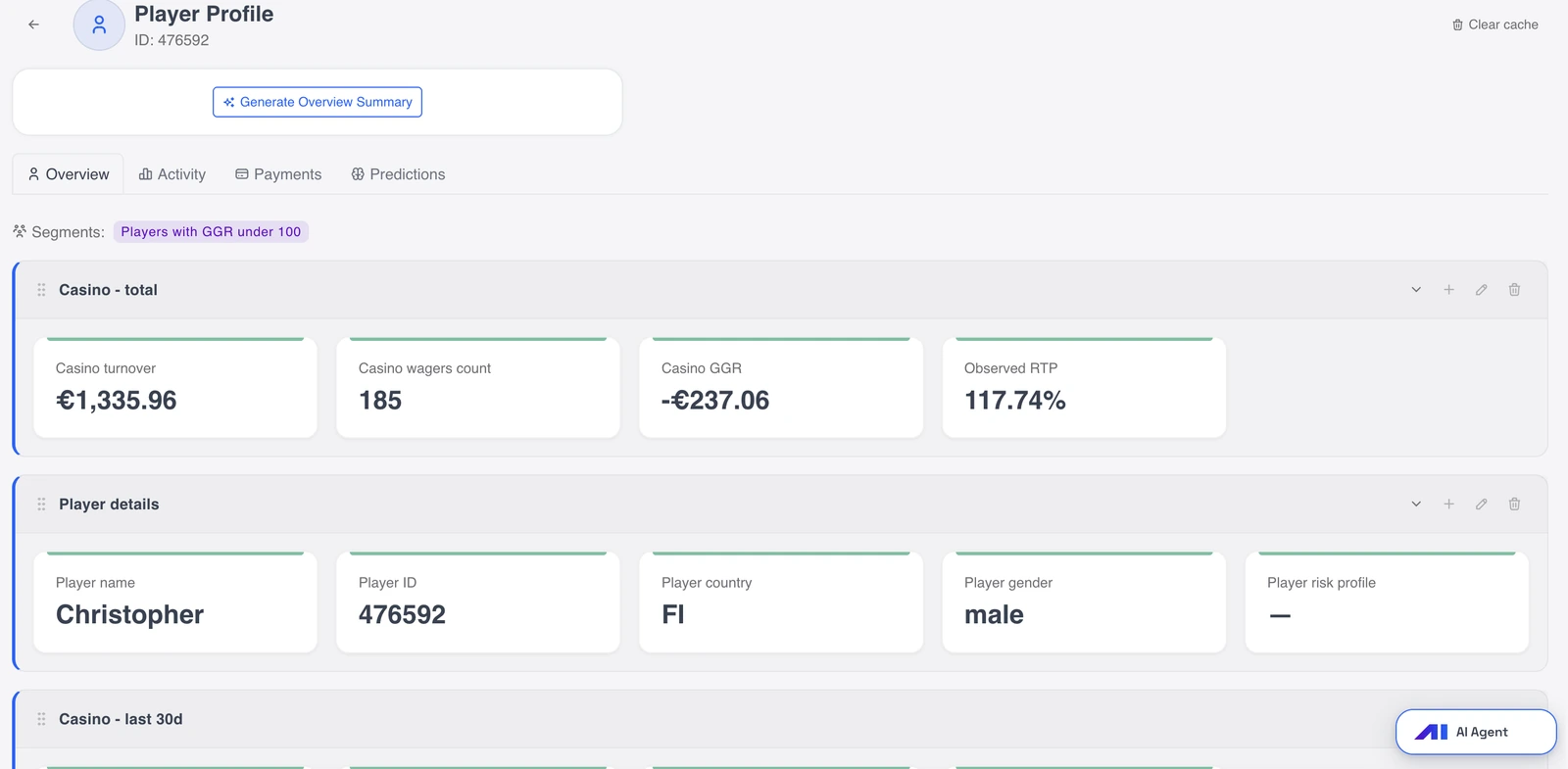
Four practical examples
From the first question
to a useful next step.
Explore the analysis, the comparisons and the context behind a decision. These are illustrative workflows, not customer results or preconfigured reports.
01 / Audience preparation
A cooling audience is a starting point, not a send instruction.
Which players fit the behavioural question and the contact policy?
The team wants to review previously active players whose recent participation has declined. A behavioural Segment needs eligibility and contact context before it becomes a campaign audience.
- Define activity, product scope and comparison window. For example, compare the last seven days with the player’s recent history.
- Inspect Attributes and Profiles. Apply eligibility and suppression rules from the established contact process, including recent campaign history.
- Review the audience with CRM. Agree delivery, membership refresh, deduplication and re-entry handling before connecting the workflow.
Choose an appropriate review or campaign for the qualified audience; the behavioural signal alone does not determine the response.
02 / Early lifecycle
Find the gap between the first and second deposit.
Which acquisition cohorts continue participating, and where does activity change?
A brand attracts new depositors, but fewer make a second deposit. CRM needs to distinguish a lifecycle pattern from a different acquisition mix or friction in the product.
- Define first-deposit cohorts and equal observation windows. Exclude incomplete windows from the completed-cohort comparison.
- Compare second deposits with activity, sessions and available payment attempts. Break down source, market and device where connected.
- Review sample journeys and campaign histories in Profiles. Discuss whether the next step belongs to CRM, product or operations.
Design a focused follow-up or investigate operational friction using the context behind the cohort difference.
03 / Campaign measurement
A return after an offer is not the same as an additional return.
Did the campaign improve the outcome compared with a suitable alternative?
A reactivation campaign records returned players. Assessing its incremental effect requires a credible comparison and a defined outcome, beyond the exposed group’s result.
- Define the eligible population, outcome window and evaluation design before launch. Consider a randomised holdout where appropriate.
- Preserve assignment records and connect exposure, activity and costs. Review contamination, missing outcomes and assignment-versus-delivery differences.
- Compare outcome rates and net economics. Assess sampling uncertainty and later activity before repeating or changing the offer.
Evaluate the intervention separately from how well the audience meets a churn or value criterion.
04 / Connected CRM workflow
Follow the handoff through to the outcome.
Did the intended audience actually receive the campaign?
A Segment was passed to the CRM, but the response is lower than expected. The investigation should separate transfer, campaign execution and confirmed exposure before blaming the audience definition.
- Keep audience and transfer identifiers. Agree what a successful API or webhook handoff means with the receiving system.
- Bring available CRM assignment, send and delivery statuses into the analysis. Inspect exclusions and failures behind the count differences.
- Measure subsequent activity against the relevant assigned or exposed population. Keep the denominator appropriate to the evaluation question.
Address the stage that needs attention with its owner; a completed handoff is not evidence that every player was contacted.
Agree the definitions
Define retention before measuring it.
Use consistent populations and windows across the audience, campaign and outcome analysis. A retained player, an active player and a player who redeemed an offer are not necessarily the same measure.
Activity recency and frequency
Time since a stated activity and the number of qualifying activities in the selected window.
Identify changes relative to a relevant baseline without assuming all players follow the same routine.
Cohort retention
The share of a starting cohort meeting an agreed activity condition in a later observation window.
Compare lifecycle stages, products and acquisition sources with a stable starting population.
Reactivation rate
The share of an eligible inactive population returning to the defined activity within the outcome window.
Separate the return you observe from the additional return attributable to a campaign.
Campaign exposure
The available assignment, send and delivery records associated with a player and campaign.
Understand whether a player qualified, was selected or actually received contact before interpreting their subsequent activity.
Incentive cost
The agreed economic measure of the incentive, with its status, period and treatment in revenue definitions explicit.
Avoid subtracting the same cost twice or equating a nominal bonus amount with its measured financial cost.
Incremental outcome
An estimated difference attributable to an intervention under an appropriate evaluation design.
Assess reactivation or value alongside uncertainty and cost, rather than calling all post-campaign revenue uplift.
Make it part of the week
Build the retention loop around a clear handoff.
The useful loop joins analysis and execution without hiding who owns each step. Start with one audience and a small set of outcome measures before extending the workflow.
Specify the audience and purpose.
Agree the lifecycle question, behavioural conditions and required eligibility context. Choose a fixed cohort for measurement or a dynamic Segment for continuing qualification. Review membership and preview Attributes with the CRM owner, including the source coverage and refresh schedule on which the audience depends.
Review player and campaign context.
Use configurable Player Profiles to connect recent activity with available acquisition, payment and campaign records. Model outputs can be included when the relevant implementation is enabled. Separate the reason someone entered the review group from the decision about contact, incentive or another response.
Connect the execution path.
Use agreed exports, API or webhook connections to bring the audience into the existing CRM process. Define the receiving system’s responsibilities, identifiers and status feedback. Campaign creation, suppression, delivery and operational actions follow the configured process and the decisions of the team responsible.
Measure and refine.
Bring exposure and outcome records back into the shared analysis. Use Reports for the campaign review and Insight Radar for the recurring checks your team chooses. Revisit both the audience logic and the intervention, keeping prediction quality, campaign delivery and incremental effect as separate questions.
Subscribe to Dashboards, download PDFs and deliver configured reports or notifications to email, Slack, Telegram, Google Chat or Microsoft Teams. Keep the review in the tools your team already uses.
Choose how the analysis starts
Ask. Keep checking.
Discover what deserves a closer look.
The same governed data supports different ways of working. Your team reviews the evidence and decides what happens next.
You ask
AI Agent
Investigate a retention change in plain language. Compare the affected cohort with its earlier activity, product context or campaign exposure, then follow the question into the evidence available for the team.
Which tenure groups explain the change in returning active players this month? Compare product mix and recent campaign exposure using the same activity definition.Explore AI Agent
You define the check
Insight Radar
Repeat a specified audience or campaign review on your chosen schedule. State the Segment, period, outcome window and comparisons, so the recurring analysis fits the way your CRM team evaluates its work.
Each Friday, review completed seven-day outcomes for last week’s reactivation cohorts. Compare assignment, delivery, returning activity and recorded incentive costs.Explore Insight Radar
It investigates
Autonomous Agent
Review independently selected investigations that connect retention behaviour with other parts of the operation. A discovery can lead to a more focused AI Agent conversation before the CRM team decides whether to respond.
Example investigation: returning activity weakens within one product cohort while payment failures rise in the same market. The team checks the relationship before changing the campaign.Explore Autonomous Agent
Connect the right context
Keep audience, exposure and response connected.
The analytical history becomes more useful when activity and campaign records share reliable identifiers. Choose the sources that support the actual retention workflow and preserve the distinction between a missing event and a recorded negative outcome.
Sources to bring together
- Player accounts, sessions and product activity
- Deposits, withdrawals and available payment attempts
- Bonus, promotion and incentive records
- CRM audience, assignment, send and delivery history
- Contact eligibility and suppression records
- Enabled predictive outputs and their history
Checks that make the analysis useful
- Agree identifiers and timestamps across audience and CRM records.
- Keep observation windows complete and distinguish assignment from exposure.
- Define refresh, deduplication and re-entry behaviour for the connected workflow.
- Use player-protection assessments in their separate protection process, not as commercial targeting inputs.
Before you begin
Practical questions.
Clear answers.
What crm & retention teams need to know about the data, the workflow and the available tools.
What is iGaming retention analytics?
It examines continuing player activity, lifecycle changes and the outcomes associated with CRM interventions. A useful analysis connects the audience definition, player history, campaign exposure and subsequent behaviour. Gamblitude provides the shared data, Segments, Profiles and reporting tools for those questions, while your team defines the business response.
What is the difference between static and dynamic Segments?
A static Segment preserves a selected group; a dynamic Segment refreshes membership as its conditions and underlying data change. Fixed populations are useful for cohort or campaign measurement. Dynamic groups support ongoing qualification. Actual freshness depends on source delivery and the configured processing schedule, rather than a universal instant-update promise.
What can a Player Profile show?
A fully configurable Profile brings together available data from connected systems: transactions, product activity, acquisition context, campaign history, Attributes and Segment membership. Predictions and their history can appear when the relevant models are enabled. The view follows the records your operation connects and the user’s access permissions.
Does a high churn score identify the right bonus recipient?
Not by itself. Player Churn Prediction estimates an agreed disengagement outcome; it does not establish who will respond to an incentive. Review player context and campaign eligibility separately. A suitable comparison design is needed to learn whether the intervention improves the outcome for the audience you selected.
How does Bonus Value Optimisation fit?
It is an individually scoped, separately quoted implementation for recommending reactivation bonus amounts for an already qualified audience. Available player and offer history informs the agreed approach. Your team defines eligibility and delivery, then evaluates meaningful reactivation and the result after costs; a recommended amount is not a guaranteed incremental gain.
Does Gamblitude send our CRM campaigns?
The analytics can supply relevant outputs through exports or agreed API and webhook connections. Your existing CRM or connected process handles its configured campaigns and actions. Agree identifiers, exclusions, re-entry rules and feedback records so the team can distinguish successful data transfer from actual campaign delivery.
Can we evaluate a campaign without a holdout?
You can describe the outcomes observed after the campaign, including activity, revenue and cost. Claiming incremental impact needs a credible evaluation design; a before-and-after comparison alone may reflect seasonality, selection or other changes. Choose the design with your analytics team and keep the strength of the conclusion aligned with the evidence.
Can we use predictive models for every product and player?
Model scope follows the agreed outcome, eligible population and available history. Predictive Models are quoted separately. Player GGR Prediction currently covers next-30-day GGR for eligible sportsbook players; other applications have their own requirements. A commercial value or churn workflow remains separate from professional responsible-gambling assessment.
See it with your team
Bring the retention question.
Connect the steps behind it.
We will walk through a player or campaign investigation using demo data, then discuss your audience definitions, CRM connections and how your team wants to measure the next decision.